
Actually Khmer Unicode does not need to be installed on Windows 7. Without making any changes any text you view in Khmer will appear, but will be mostly unreadable because of its small size.
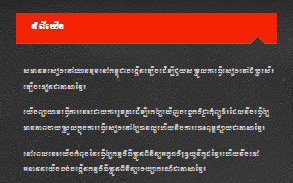
Here is a sample of what Khmer Unicode looks like in Windows 7 when you look on a website (in this case sbbic.org) before any changes are made:
Also, title bars are difficult to read:
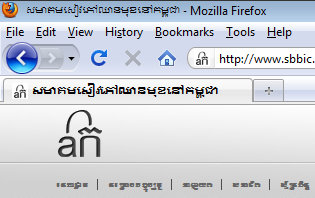
So how do we make it so that Windows 7 will display Khmer Unicode correctly and allow you to type in Khmer?
First, download this collection of Khmer Unicode fonts (we collected some of the main Khmer Unicode fonts available into one .zip file for easy download).
Download “All Khmer Unicode Fonts”
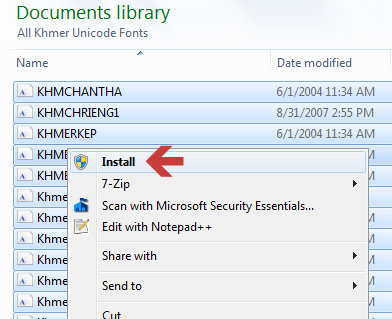
All-Khmer-Fonts-9-26-15.zip – Downloaded 257161 times – 29.00 MBAfter you download them, extract the files to a folder and then select all the fonts and then right click and choose “Install” (pictured below):
Once all the fonts are installed download the SBBIC Khmer Unicode Keyboard so that you will be able to type in Khmer. Our keyboard is based on the Khmer OS keyboard with a few slight modifications. It will work with both 32-bit and 64-bit systems. Download the SBBIC Khmer Unicode Keyboard here.
Download “SBBIC Keyboard 64-bit and 32-bit Windows Installer”
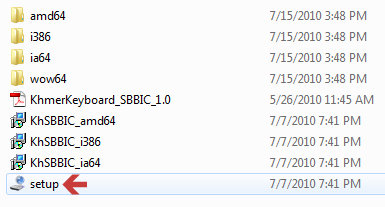
SBBIC-Khmer-Keyboard-1.0.zip – Downloaded 60505 times – 467.23 KBAfter downloading, extract the .zip file and double-click on setup:
You will also find the SBBIC Khmer Keyboard Layout in the “KhmerKeyboard_SBBIC_1.0.pdf file that you can use for reference when learning to type in Khmer Unicode.
Now that you have installed many of the most used Khmer Unicode fonts and a keyboard, you will find that many websites (such as sbbic.org) will display in Khmer correctly. But title bars are still difficult to read.
In order to change the Khmer font used in title bars you will need to make some changes to the Windows registry. Please make a backup of your registry before attempting to make any changes (to backup your registry click the start menu and type “regedit” The Windows registry editor will appear, then click the file menu and click “Export” and export your registry to a safe location).
You can download this zip file (from nokorsoft.com) that includes the file “fixWindows7.reg” which will make the changes for you or you can manually make the changes. If you download the zip file extract its contents and double-click the file baned “fixWindows7” and accept the changes to your registry. Or you can make the following changes yourself:
[HKEY_LOCAL_MACHINESOFTWAREMicrosoftWindows NTCurrentVersionFonts]
“Daunpenh (TrueType)”=-
“Khmer UI (TrueType)”=-
“Khmer UI Bold (TrueType)”=-
[HKEY_LOCAL_MACHINESOFTWAREMicrosoftWindows NTCurrentVersionFontSubstitutes]
“DaunPenh”=”Khmer OS System”
“Khmer UI”=”Khmer OS System”
“Khmer UI Bold”=”Khmer OS System”
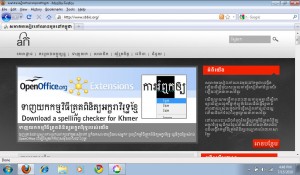
Now restart your computer and everything should be running smoothly! Now websites in Khmer should display perfectly as this screenshot:
Next, install the Khmer Spelling Checker and also try out the new Khmer Grammar Checker!


100 Comments. Leave new
អរគុណច្រើនសំរាប់ការណែនាំដ៏មានប្រយោន៍!
ហេតុអ្វីបានជា Print មិនពេញលេញ ក្នុង Window7 ជា Font Khmer Unicode?
ឧទាហរណ៍ៈ ចំនួន -to- ចនំួន -ប៉ុន្តែ ពេល View print ឃើញធម្មតា
សូមជួយដោះស្រាយឱ្យផង សូមអរគុណ!
my e-mail: [email protected]
What program are you having trouble in? Word 2007? The way Unicode responds has much to do with what program you are using it in.
My trouble is in both Word 2007 and Excel 2007
My problem is just on some Text, but not all. As my first comment I told you.
You might try downloading the latest drivers for your printer. You could also try using another Khmer Unicode font and see if it still has issues (just to troubleshoot to find out what is causing the problem). If you can, try another computer as well so we can isolate the issue. Let me know what happens.
thanks. it is useful to follow your instruction.
I Want to learn khmer and how to type Khmer.
You can download KhmerOS’s Khmer Fast Typing trainer here: http://sourceforge.net/projects/khmer/files/Khmer%20Fast%20Typing%20Program/
Thanks work great for me !
I install font khmer unicode already why i can’t type font khmer unicode every where and can’t change key board too.
@Dara – click the start menu and type “change keyboards” and click the first link that comes up. Click the button “Change Keyboards…” and see if there is a Khmer keyboard listed. If not – add it. Let me know if that fixes it. If there is no Khmer keyboard available, install the keyboard we listed on this page: https://sbbic.org/wp-content/uploads/2010/07/SBBIC-Khmer-Keyboard-1.0.zip
i use Unicode in my adobe indesign so it not know ជើង គ្រប់ទាំង font ទាំងអស់ នៅក្នុង កម្មវិធី Adobe ប៉ុន្តែមាន font ខ្លះ ស្គាល់ ដូចជា Nida ប៉ុន្តែក្នុង ចំនោម font ទាំងអស់ នោះ មានខ្លះ ក៏មិនស្គាល់ ដែរ តើ ធ្វើ ដូចម្តេច ដើម្បី អោយស្គាល់ បាន សំរាប់កម្មវិធីទាំងអស់ នេះ?
Hi Oumtithrorn,
If you use fonts with the “Kh-” prefix (included in https://sbbic.org/lang/en-us/2011/01/06/download-all-khmer-unicode-fonts/) you should be able to type and render Khmer Unicode correctly in Adobe products. An example font is “Kh-Battambang.ttf” Let me know if you have trouble getting the fonts installed.
I’m trying to use khmer fonts unicode with the notepad; I can’t change fonts or size to display the different fonts’ style on the same page.
I also try to use the wordpad. The problem is I can’t corrected the words that prevousely typed.
Your help in this matter is deeply appreciated.
Hello Sambath,
Thanks for visiting! Notepad is not the best option when you want to format things with different fonts and styles. I would recommend OpenOffice (http://www.openoffice.org) it is a free Word processor and works great with Khmer Unicode.
-Nathan
How come everytime I use khmer fonts some word I type it has a space between them? Because I set up the keyboard wrong or becuase of something else?
Hello TY,
What program are you typing in? If you type in Notepad are there still spaces between some words?
-Nathan
I’m typing in microsoft word and couple of othere program. Especially cyberlink power producer, I only can type regular, but not with the shift.
TY: Microsoft Word 2007 should work without problem (2003 should as well, but sometimes it will have trouble). I would assume then that cyberlink power producer does not support Khmer Unicode. Even though Windows 7 supports Khmer Unicode it is still up to the various programs to also support it. Adobe products do now support Khmer Unicode if you use the right fonts (download our font pack and use the supplied fonts that start with “KH”). https://sbbic.org/2011/01/06/download-all-khmer-unicode-fonts/
Why can’t I use spacebar?
Hi Ty,
Depending on what keyboard you are using the spacebar is used for two different things. If you are using NiDA or SBBIC’s keyboard, the spacebar creates a non-breaking space (invisible) so that words will stay together when they come to the end of the line on a page, also this allows our spelling checker to check each word. On the default keyboard for Khmer in Windows 7 (PANCambodia’s) the spacebar is used to add a jung, and the forwardslash (/) is used to add a non-breaking space. On both keyboards to do a real space you hold shift and then press the spacebar.
Hope that helps!
Excuse me! I can see the Khmer Unicode keyboard in the Change Keyboard, but why I can’t use it for typing?
Hello Katty,
When you select the “KH” (next to the clock on the task bar) or click “EN” to change it to “KH” and then start typing in notepad what happens? Some programs still cannot use Khmer Unicode, so when testing it is safest to use notepad because it does support it. Microsoft Word 2007 and above also supports Khmer Unicode without issue (2003 can as well, but sometimes it has problems). Let us know if there is still an issue and we can work through it.
ខ្ញុំចង់ដំឡើងយូនីកូដ ក្នុងwindow7 64 bit ប៉ុន្តែ សញ្ញដាក់ជើង នៅ space ទៅវិញ?
In order to use the NiDA keyboard (where J adds a ជើង) with a Windows 64-bit system you can install the SBBIC keyboard here: https://sbbic.org/2010/07/07/khmer-unicode-keyboard-64-bit-and-32-bit-windows-installer/
សួរស្តីរ
ខ្ញុំមានបញ្ហាជាមួយកុំព្យុទ័រតួអក្សរ ពេញតូ ខ្ញុំមិនអាចសរសេរ តូអក្សរពេញតួបានទេ សូមជួយប្រាប់ខ្ញុំផង
សូមអរគុណទិកជាមុន
សួស្ដី សារិន
សូមទៀនយក https://sbbic.org/wp-content/plugins/download-monitor/download.php?id=15 ហើយមើលរបៀបវវាយតួអក្សរទាំងអស់។ បើសិនជាអ្នកនៅតែមានបញ្ហាសូមមេតាប្រាប់យើងម្ដងទៀត។
how come everytime I use vowel the sentence have a space between the letter?
I’m not quite sure if I understand you correctly t.y – Can you be a little more specific? You should not have to put a space between the vowels. But remember that not all programs support Khmer Unicode – even though you have Windows 7, Khmer Unicode still will not work with everything. When you type in Notepad, does it look right?
I have installed Khmer Unicode as per instructions. However, the foot consonants do not display correctly, or usually, at all. I suspect the problem is Win XP or my specific computer. Has anyone had the same problem?
Don’t ask me to install Win7: one, my computer is too old to cope with anything newer than XP, and two, I cannot afford Win 7 anyway.
សួស្តី!
ខ្ញុំមានបញ្ហាចំលែកមួយពេលប្រើប្រាស់អក្សរយូនីកូដជាមួយកម្មវិធីAdobe Photoshop, InDesign។ ជាទូទៅខ្ញុំអាចសរសេរដោយប្រើយូនីកូដដោយគ្មានបញ្ហា។ តែពេលណាខ្ញុំបង្រួម ទំហំអក្សរមកនៅតូចជាង១០ឬ១១pt. ពាក្យមួយចំនួនធំចាប់ផ្តើមមានបញ្ហា។ ជើងនិងស្រៈរញ៉េ រញ៉ែអស់។ ឥឡូវខ្ញុំកំពុងចង់បង្កើតទស្សនាវដ្តីសំរាប់សាលាខ្ញុំ តែជួបបញ្ហានេះ។ សូមអ្នកទាំងអស់គ្នាជួយដោះស្រាយផង។ សូមបញ្ជាក់ថាខ្ញុំបានដំឡើងFont អក្សរដែលផ្តើមដោយ KH រួចរាល់ហើយ។ សូមអរគុណ!
Hello រស្មី – we hope to release a template soon that will make things easier for using Khmer Unicode with Adobe InDesign. For now, try downloading the templates here: http://www.thomasphinney.com/2009/01/adobe-world-ready-composer/
Let us know if you have more success.
I can not use font of khmer unicode well because the foot consonants do not display, and now i can not download from ur website too, so have any way for me to find structure.thanks
Hello – are you using Windows 7? Does Khmer Unicode show correctly in Notepad? Some programs do not yet show Khmer Unicode correctly, so first make sure it is working in Notepad. You can download a collection of Khmer Unicode fonts here: https://sbbic.org/lang/en-us/2011/03/31/download-every-known-khmer-font-all-at-once
សូមជំរាបសួរ! អ្នកទាំងអស់គ្នាបាទ! ខ្ញុំមានសំណូមពរមួយណ៎ា! តាមយបល់របស់ខ្ញុំ ៗ ឆ្ងល់ណាស់ ហេតុអ្វីអក្សរខ្មែរយូនីកូដមិនអាចប្រើជាមួយ CorelDraw អញ្ចឹង? បើតែយ៉ាងហ្នឹង តើយើងរាល់គ្នាខំប្រឹងប្រើធ្វើអ្វីទៀត ។ ខ្ញុំឃើញភាសាដទៃៗ គេរីកចម្រើនណាស់ដូចជាភាសា ថៃជាដើម ។ ចំណែកខាងអក្សរខ្មែរយើង ក្នុងកម្មវិធីនិមួយៗ ប្រើពុម្ពអក្សរខុសៗគ្នា ពិបាកប្រើមែនទែន ហ៊ឺ!…………!
ពេលនេះខ្មែរមិនទាន់ដើរក្នុងកម្មវិធី CorelDraw ប៉ុន្តែភាសាខ្មែរដើរក្នុង Adobe Illustrator CS3, 4, និង 5។ ខ្ញុំមិនដឹងមូលហេតុ CorelDraw មិនទាន់ឲ្យកម្មវិធីគេដើរជាមួយភាសាខ្មែរ។ ប្រហែលសួរ Corel។
បងប្រុស
ជាបថម ខ្ញុំសូម អរគុណបងខ្លាំងណាស់សំរាប់ការបង្កើតនិងជួយដោះស្រាយបញ្ហាជាច្រើនទាក់ទងនិងហ្វុនខ្មែរយូនីកូត ។
សំរាប់ខ្មុំ នៅក្នុងកម្មវិធី Adobe Photoshop, Illustator, CS3, CS4, CS5 វាមិនមានបញ្ហាអ្វីទេសំរាប់ហ្វុន យូនីកូតខ្លះ ។ ប៉ុន្តែនៅក្នុង កម្មវិធី Adobe After Effect CS5 ខ្ញុំមិនអាចសរសេរអក្សរខ្មែរបានទាលតែសោះ។ សូមមេត្តាជួយដោះស្រាយអោយផង ។
សូមអរគុណ!
សួរស្តី ខ្ញុំមានបញ្ហាមួយគឺសរសេរពុម្ភអក្សរខ្មែរយូនីកុដមិនចេញជើងនៅក្នុងកម្មវិធី Photoshop CS5
សូមជួយដោះស្រាយផង អគុណ
If you use fonts that start with “KH” they should work with Adobe Photoshop CS5. Download all the fonts here https://sbbic.org/downloads/all-khmer-unicode-fonts.zip, and try the fonts that start with “KH” Let us know if you still have any problems.
how do i put the sign above the letter or underneath
សួរស្តី ខ្ញុំមិនអាចវាយ Internet ជាភាសារខ្មែរទេ
វាចេញ អីុន រឺ អុីន ៕
សូមអរគុណទុកជាមុន
PS: ខ្ញុំប្រើoffice 2007 on window 7 professional edition
ក្នុងMs.word គេវាយ អ+៊+ី(G/I) វាចេញហើយ។
ខ្ញុំចងសរសេរពាក្យថា “ឲ្យ” ក្នុង Window 7 ដោយប្រើ PanCambodia Keyboard ប៉ុន្តែរកអត់ឃើញទេ..ជួយប្រាប់ផងថាវានៅកន្លែងណា???
I can’t use space bar for ជើង, any solution to fix the issue with window 7?
Just to let you know that the issue is solved. I have window 7, but the unicode doesn’t work with microsoft office with my computer. I tried to use Wordpad, now everything is OK.
ខ្ញុំមានបញ្ហាក្នុងការដាក់ជេីង និង សញ្ញាមួយចំនួន សូមជួយដោះស្រាយខ្ញុំផង
Hi, I’ve installed khmer unicode and it’s working fine until I tried to type it in italic and it didn’t work.
How do I fix this?
Thanks.
Why it is so complicated to make Khmer Unicode work? Maybe it look like a rocket science. Since windowsxp – > windows 7. Khmer Unicode is still a nightmare
Can you please show me how to download khmer fonts by using window 7? I have trouble with it now.
Thanks,
Channy
I tried to download FixWindows7.reg from http://www.nokorsoft.com but without success, and try to understand your manual fix of the registry but could not understand it. In registry, it has, Name, Type and Value Data. Example of DaunPenh. Name is DaunPenh(TrueType), Type is REG_SZ, and Value Data is DaunPenh.ttf. Where do I need to change?
very helpful indeed!!!!!!!!! Your font system works instantly. The manual reg edit works really fine. I am really glad. Thanks a million
i don’t know
well i just download khmer unicode into my computer,but after i downloaded it i can’t see the word install.and i also can’t see the icon show on my computer.so how can i do it?
Hello Phatana – Make sure and download the file to a location you can find it again. Many times, downloads go into your download folder.
ខ្ញុំសូមសួរបន្តិចពីការវាយអត្ថបទក្នុង MS Word 2010 with Win 7 64bits ពេលដែលខ្ញុំត្រូវដាក់ជើងវាមិនទាន់លោតភ្លាមទេ ទាល់តែវាយស្រះទើបលោត។ សួមជាប្រាប់ផង
Make sure you are using the right font – try some different fonts and see if they work. Otherwise try a different keyboard for Khmer Unicode: https://sbbic.org/2010/07/07/khmer-unicode-keyboard-64-bit-and-32-bit-windows-mac-os-installer/
If you still are having trouble, write some text in Khmer in Office 2010 with the jungs incorrectly placed, and paste it into a comment here so I can take a look. Hope that helps!
តើមានវិធីណាដែលអាច Font ពី Unicode ទៅ Limon ឬពីLimon ទៅ Unicod ដែររឺអត់?
Hi!.. I’ve installed Unicode Conversion ( PAN Localization Cambodia on Window 7 64 bit. but it’s always error when i try to this Unicode conversion. Any one can share to how make it run.
ចង់សួរថា តើ Unicede អាចប្រែអត្ថបទ អង់គ្លេស មក ខែ្មរ ដូចភាសាគេដ៏ទៃ(google translator) ហើយឬនៅ?
ចង់សួរថា តើ Unicode អាចប្រែអត្ថបទ អង់គ្លេស មក ខែ្មរ
ដូចភាសាគេដ៏ទៃ(google translator) ហើយឬនៅ?
ខ្ញុំសុំសួរថាហេតុអ្វីបានជាពេលខ្លះខ្ញុំតំឡើងយូនីកូដរូចហើយប៉ុន្តែវាមិនមានជើងសម្រាប់បុកអញ្ចឹង?
ខ្ញុំចង់ប្តូរ Font ដើម្បីឲ្យ File Name ឬ Folder Name នៅលើ Windows 7, or 8 ថ្វើយ៉ាងម៉េចទៅ?
Hello Leakhys,
Windows 8 has discontinued that feature. But you can edit the registry (don’t do this unless you are an experienced PC user): http://superuser.com/questions/465404/how-to-change-the-fonts-in-windows-8
Also, you can download a Khmer language pack if you want Khmer fonts. http://windows.microsoft.com/en-us/windows-8/using-multiple-languages
Windows 7 still has the option via the Window Color and Appearance settings in the Control Panel.
តើធ្វើដូចម្តេច ដើម្បីឲ្យ Font Khmer Unicode ដំណើរការលើ VBA នៃ MS.Access បាន?
From what I can tell the VBA coding window in MS Access does not support Unicode. You can deal with Khmer with VBA in Access as seen in this youtube video: https://www.youtube.com/watch?v=KpmTKyMyY4k
អរគុណលោក Nathan Wells ចំពោះការចែករំលែក ខ្ញុំនឹងយកចិត្តទុកដាក់សាកល្បង។
ហេតុអ្វីបានជា Unicode Font មិនអាចប្រេីក្នង Adobe After Effect ?
Adobe has been inconsistent with supporting Khmer Unicode. You can use Photoshop to type Khmer and import the .psd file into After Effects. I don’t have the latest After Effects, so it is possible that After Effects CC supports it (I only tested CS4).
Thanks Nathan for making this available. The apparent lack of support for the keyboard layout for Win 7 64-bit by KhmerOS is regrettable. I needed your file here!
Glad to be of help!
ខ្ញុំរាយឌៃជេីង អត់ចេញទេ ក្នុងកម្មវិធី photoshop
It depends on the version of Photoshop you are using (CS 4 and above should work). Also try using the fonts that start with Kh (Kh Battambang).
Hi sir; How are you? I installed khmer unicode & khmer font on Mac I can use on Microsoft word very well,but when type on Microsoft Excel not well.Problem unknown khmer foot.Please help me?
how to fix khmer type unicode KH on After effect cc and Premier CC? Any solve?
Merci beaucoup ! Thank you so much, I searched for years a solution for this problem. You saved me!
មិនអាចដាក់ជេីងបានធេីយ៉ាងម៉េចទៅ ?
Not all applications support Khmer Unicode. Which application are you trying to use?
Try typing in Notepad or Microsoft Word 2003 or higher and see if it works with a Khmer Unicode font selected (like Khmer OS).
Setting display font to Khmer OS System makes the font italic. Is there a way to prevent this? (I deleted the registry key for Segoe UI (True Type) and added font substitute for Segoe UI (True Type) as Khmer OS System. This is in Windows 10.
At this time I am not sure – Microsoft changed some things with Windows 10 that make it harder to substitute fonts.
មានfont Tacteingឬទេ? រកគ្រប់កន្លែងហើយតែមិនមានសោះ
Thank you.
Hello Admin!
I have a problem with my new laptop. My old laptop is Win 7 and normally i use khmer unicode with size 11 is ok and can it it clearly (size 11 of unicode = size 11 of English font, if I key in both language). But for my new laptop, i use Win 10 and i setup unicode already but when i key font in size 11 it looked so small. Even i send e-mail from my old laptop to new laptop and compare the real view is different size.
Thanks in advance for your reply and support.
Just use a different font, like “Content” or “Khmer Mondulkiri”
ខ្ញុំចងដំឡើង Font Khmer Unicode Standard ដែលដាក់ជើងនៅលើ space មិនមែនក្នុងអក្សរ J តើត្រូវអនុវត្តយ៉ាងដូចម្ដេចខ្លះ?
Try this one: https://sbbic.org/2010/07/07/khmer-unicode-keyboard-64-bit-and-32-bit-windows-mac-os-installer/
ខ្ញុំមានហើយតែចង់សូមអគុណអស់លោកដែលខំប្រឹងប្រែងបង្កើតអក្សរខ្មែរឲ្យកាន់តែសម្បូរនឹងល្បី ខ្ញុំសង្ឃឹមថាទៅថ្ងៃមុខអក្សរខ្មែរនឹងល្បីថាស្អាតគួរឲ្យទាក់ទាញភ្នែកចង់អានចង់មើលទូទាំងពិភពលោកមិនខាន ។